CppPilot feature Visual Studio C++
Review Git changes with AI
Start a review from the Git Changes window before you commit. CppPilot asks your selected AI to look for bugs and risks in your changes, and shows each finding with its priority and location.
Transcript
A C++ change reviewed by CppPilot before the commit, and its findings fixed. The Average function of Ledger was just rewritten with an index loop.
The change is not committed yet. Before you commit, open the Git Changes window, and click Review with CppPilot.
The AI reads the staged, unstaged, and untracked changes, with the code around them. The review itself changes no file.
Two findings, with priority and location. High: the loop reads one element past the end of the vector.
Medium: the empty-vector guard is gone, so an empty list divides by zero. Keep the findings that matter, and click Fix review findings.
The AI corrects only what the findings describe: the loop stops before the end, and the empty-input guard is back. Check the diff in Git Changes, then commit.
CppPilot explains and fixes C++ build errors in Visual Studio.
- ChooseChanges, file, or branch
- ReviewFindings + locations
- SelectKeep relevant findings
- CorrectReview requested edits
A review produces findings with locations. Choose which findings to send back for correction; the initial review does not edit files.
Review what you are about to commit
Choose Review with CppPilot in the Git Changes window to review the staged, unstaged, and untracked changes. You can also review the current file, only the changes of the current file, or a whole branch against the parent branch CppPilot detects.
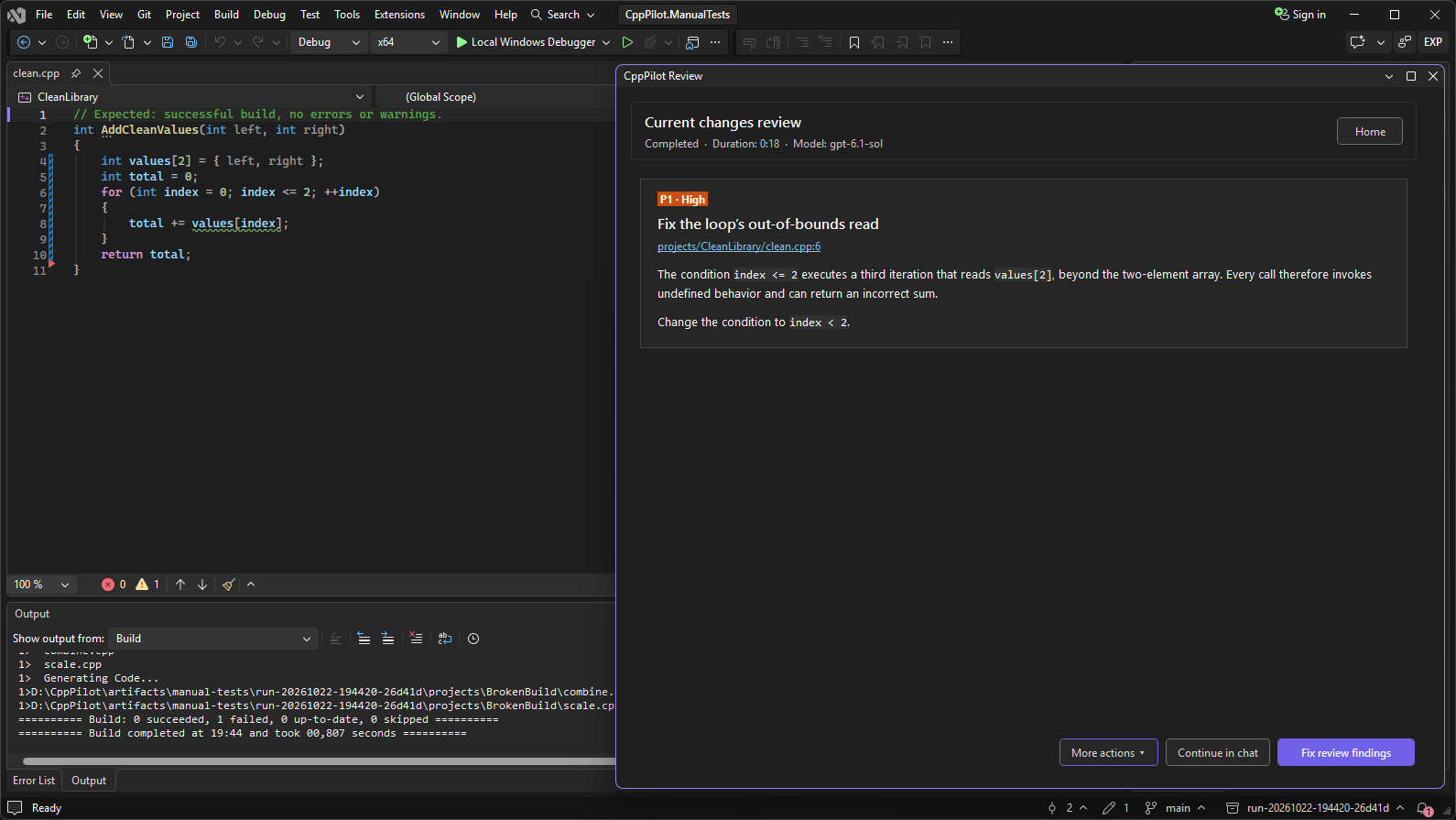
Read the findings
Each finding is a card with a priority, a clear title, a clickable file and line, and an explanation: an out-of-bounds read, a leaked handle, a missing lock, an unchecked return value. The review itself never changes a file.
Reviewed change
int sum(const std::vector<int>& items) { int total = 0; for (std::size_t i = 0; i <= items.size(); ++i) total += items[i]; return total;}Example correction
int sum(const std::vector<int>& items) { int total = 0; for (std::size_t i = 0; i < items.size(); ++i) total += items[i]; return total;}Fix the findings you keep
Select the findings that matter and choose Fix review findings: CppPilot sends only those back to the AI for a focused correction, with your approval for each change. Or choose Continue in chat to discuss a finding with your own Codex or Claude account.
Using CppPilot in Visual Studio
CppPilot connects your own Codex or Claude account to Visual Studio. If you have neither, CppPilot Cloud provides AI access for build fixes, reviews, crash analysis, and project checks. AI chat requires your own Codex or Claude account.